How to See Deleted Posts from a Telegram Channel
Learn how to see deleted posts from a Telegram channel using caches, archives, admin logs, and continuous tracking tools like Statiko.

Most advice on how to see deleted posts from a Telegram channel starts from a wrong assumption: that Telegram keeps a universal recovery history. It doesn't. If you weren't already capturing the channel before the post disappeared, Telegram hands ordinary viewers nothing afterward. For public channels the real options are narrow — cached copies, forwarded copies, third-party archives, or continuous tracking that was already running before deletion.
Why Deleted Telegram Posts Usually Cannot Be Recovered
Deleted Telegram posts are gone for everyone who didn't capture them first. There is no universal restore path for public-channel viewers, and that's the part most recovery advice skips. Visibility depends on prior indexing or admin access, not on a built-in rewind PPC World.
Personal chats are a different problem
Private chats run on different logic. Recovery there is about your own device history, not public-channel monitoring, and the limit is blunt: deleted Telegram messages cannot be restored at all for many users, even through support ADPASS. Forum tricks fail so often because they aim at the wrong target.
For a public channel, one question matters: did a copy exist before deletion? If nobody saved it, the post is gone from the viewer side.
Practical rule: if the post wasn't archived, cached, forwarded, or indexed before deletion, you can't reconstruct it later.
The admin log gives you a short window
Channel admins have one native route: the Recent Actions admin log. Deleted messages and posts stay visible there for roughly 48 hours, then the record drops out ThinkT3. That makes the log useful for a narrow slice of recent deletions, and only for people with admin access.
A permanent record of deleted channel posts needs continuous tracking that was already running before the deletion. It's the same reason how to recover deleted Telegram messages only becomes realistic when the post was being tracked in advance.
Checking the Admin Log for Recently Deleted Posts
If you own or admin a public channel, start here. Everything else is a fallback. Recent Actions is the only native place where deleted channel posts still surface, because you're reading the channel's own moderation record instead of asking Telegram to restore content for ordinary viewers Telegram Adviser.
Where to find it
Open the channel in Telegram Desktop or in mobile admin settings, go to Channel Info or the admin section, and open Recent Actions. Telegram records deletion activity there for admins, including content you can still copy while it remains visible.
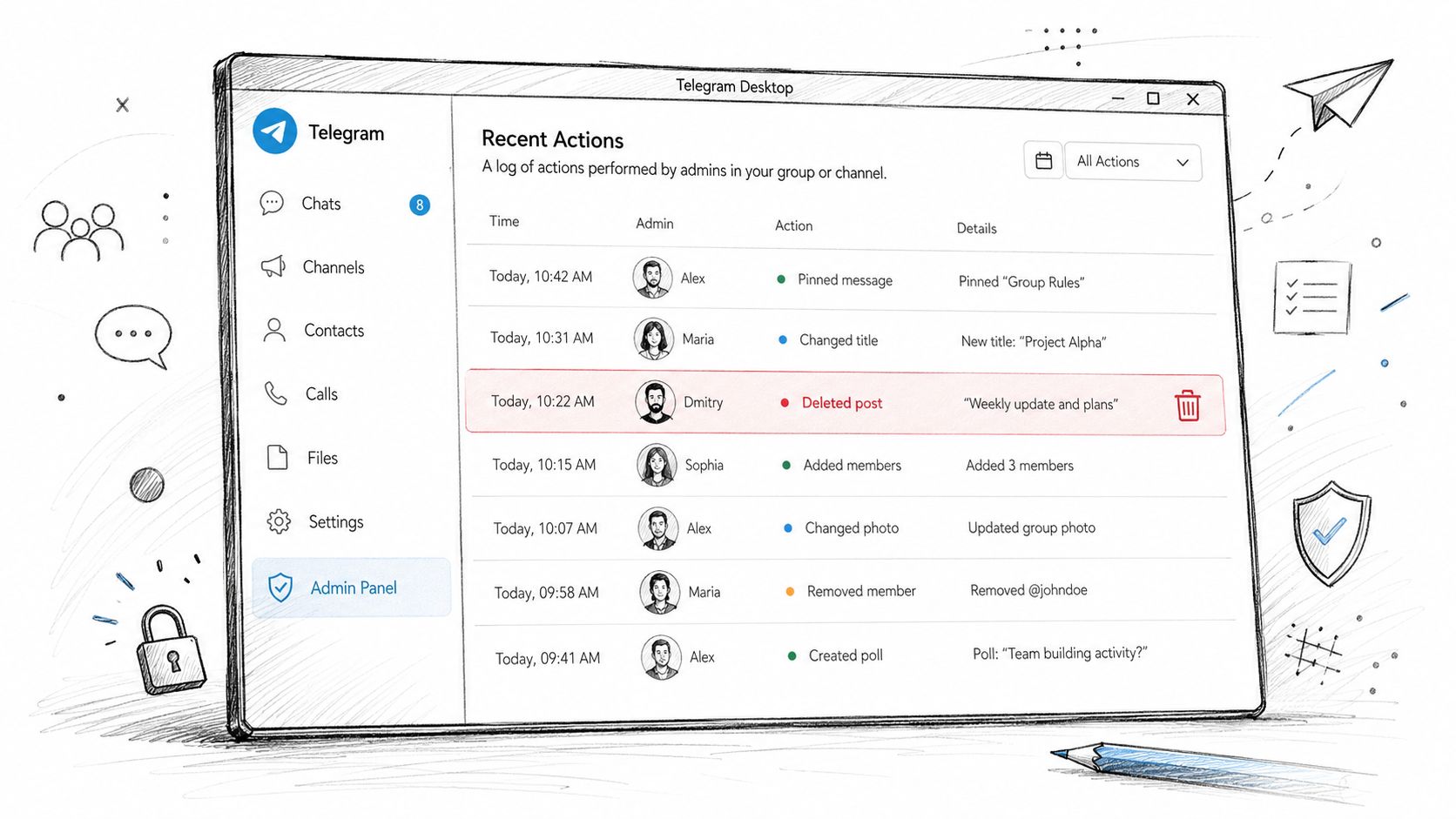
If you deleted the post yourself, the log may still show it. If another admin deleted it, the log can show that action too, but only while the record sits inside the short visibility window.
What you can do with it
Copy the post text immediately if it appears. Don't assume it will stay. The 48-hour window matters because the log is an audit trail, not a permanent archive ADPASS.
- Open Recent Actions fast: check the admin log as soon as you notice a deletion.
- Copy the text immediately: save anything visible outside Telegram right away.
- Check media separately: photos and attached files can drop out of the log faster than text.
- Treat it as temporary evidence: it's a short-lived administrative record, not a repository.
What admins should not expect — the log won't rescue every deletion forever. Once the record leaves the 48-hour window, that native path is finished. If you're not an admin, you never had access to it.
Searching Local Cache and Device Storage
Cached previews are a fallback, not a recovery method. Telegram leaves media on a device for a while, so a deleted post's photo, video, audio, or document may still sit in local storage after the message itself is gone. That only helps if the file was downloaded or previewed before deletion.
What to inspect first
Open Telegram Settings, then Data and Storage and Storage Usage, and look for media categories tied to recent channel activity. On desktop, check the app's local folders as well, because Telegram often stores media outside the visible chat timeline.
Start with the files most likely to survive deletion:
- Media files: photos and videos that were downloaded or previewed.
- Music or voice files: audio Telegram cached during playback.
- Document folders: PDFs, archives, and attachments that opened locally.
- Recent downloads: anything Telegram passed through the device before the post vanished.
Why this works only sometimes
Cache is temporary by design. Telegram can hold deleted items for a while, but that's not a promise of preservation. Once the app rotates cache, you clear storage, you reinstall Telegram, or the OS purges old files, the trail is gone.
On Android and iOS the search means checking storage usage screens or system file areas for orphaned media. On Telegram Desktop it's faster to inspect the local data folders than to browse chats one by one. Either way you're looking for a file that already synced, not for a message Telegram can rebuild.
If the media never loaded onto your device, cache checking won't help. No local file means no local recovery.
Where a post was preserved elsewhere, Statiko's forward tracking approach is the better answer, because a forward stays a separate copy that can still be checked after the original is deleted.
Give this method a few minutes, not an afternoon. If the post was recent and media-heavy, check the obvious folders and storage screens. If you find nothing, stop. The YouTube walkthrough is enough to show where Telegram hides local files.
Using Forwarded Copies and Third Party Archives
Forwarded copies are the first workaround worth checking for public channels, but only if someone already saved the post for you. A forward made before removal keeps the text after the original disappears. Archive-style services can do the same for public channels, but only when they indexed the post in advance.
Forwarded copies are only as good as the people who saved them
Search your own chats, team groups, saved messages, and discussion threads for forwards from the channel. If someone reposted the content, the wording often survives even though the source channel deleted it. It's one of the few low-effort checks that can still surface the original text.
For how forwarding actually behaves, see Telegram forwarded message mechanics. A forward is a separate copy, so deletion in the source channel doesn't erase the forwarded instance.
Archive sites can help, but coverage is uneven
Public indexers such as Telemetr and TGStat sometimes keep historical channel records, including deleted posts, because they capture content over time instead of trying to recover it later. They're archives, not restoration systems. Deleted posts frequently sit behind paid access, and TGStat's publication filter has to be switched before deleted posts stop being hidden. Read them as archives with partial coverage, not as a guaranteed recovery path.
Coverage varies by channel, by timing, and by whatever the indexer happened to capture before deletion. The same constraint is why a generic web crawler is the wrong tool here at all, which is covered in more depth in your Telegram Wayback Machine.
What to expect — not every channel is covered, and not every deleted post is visible. Free access may hide historical deletions entirely.
Archive tools only work when the channel was already being tracked. If the service didn't capture the post before deletion, there's nothing to retrieve.
Use these checks as supplementary evidence, not as your main plan. They're good for confirming what existed and weak as a standalone recovery method.
Continuous Tracking With Statiko for Reliable Deletion History
If you want a real answer for public channels, this is it. Continuous tracking before deletion is the only reliable way to preserve deleted posts, because the timeline has to exist first. Statiko tracks every post, every edit, and every deletion in public channels over time, so you can inspect the history instead of guessing after the fact.
Why retroactive recovery keeps failing
Every other method in this guide depends on prior capture. Cached previews depend on your device holding the file. Forwarded copies depend on someone resharing the post. Archives depend on an indexer grabbing the content in time. Telegram offers no universal public-history rewind, so a post nobody captured is simply missing from the viewer side.
A channel page on Statiko shows the channel's history, including edits and deletions, rather than asking you to reconstruct the past from scraps. Start with Statiko's channel search, then open individual channel pages such as a Telegram channel history view or another public channel page to see how deletion history appears in practice.

What the timeline gives you
The useful part isn't that a post existed. It's that you can see what changed, what disappeared, and when. That matters for channel owners, researchers, marketers, and analysts who need a clean historical record instead of a guess built on screenshots.
Setup is short: search the public channel, open the channel page, review the post history. The same catch-up logic is documented in AI summaries of Telegram channels — capture now, inspect later.
What to use it for
Use it when you care about future deletions, not just past ones. If a channel posts fast and deletes fast, continuous tracking is the only defensible strategy. You're not recovering after the deletion event, you're preventing the loss of evidence in the first place.
Free core features include edit and deletion history — the edit history guide shows what that version chain looks like — plus growth analytics and AI insights. That's enough for serious public-channel monitoring without pretending Telegram itself is a historical archive.
Comparing Statiko With Proxies and Other Monitoring Alternatives
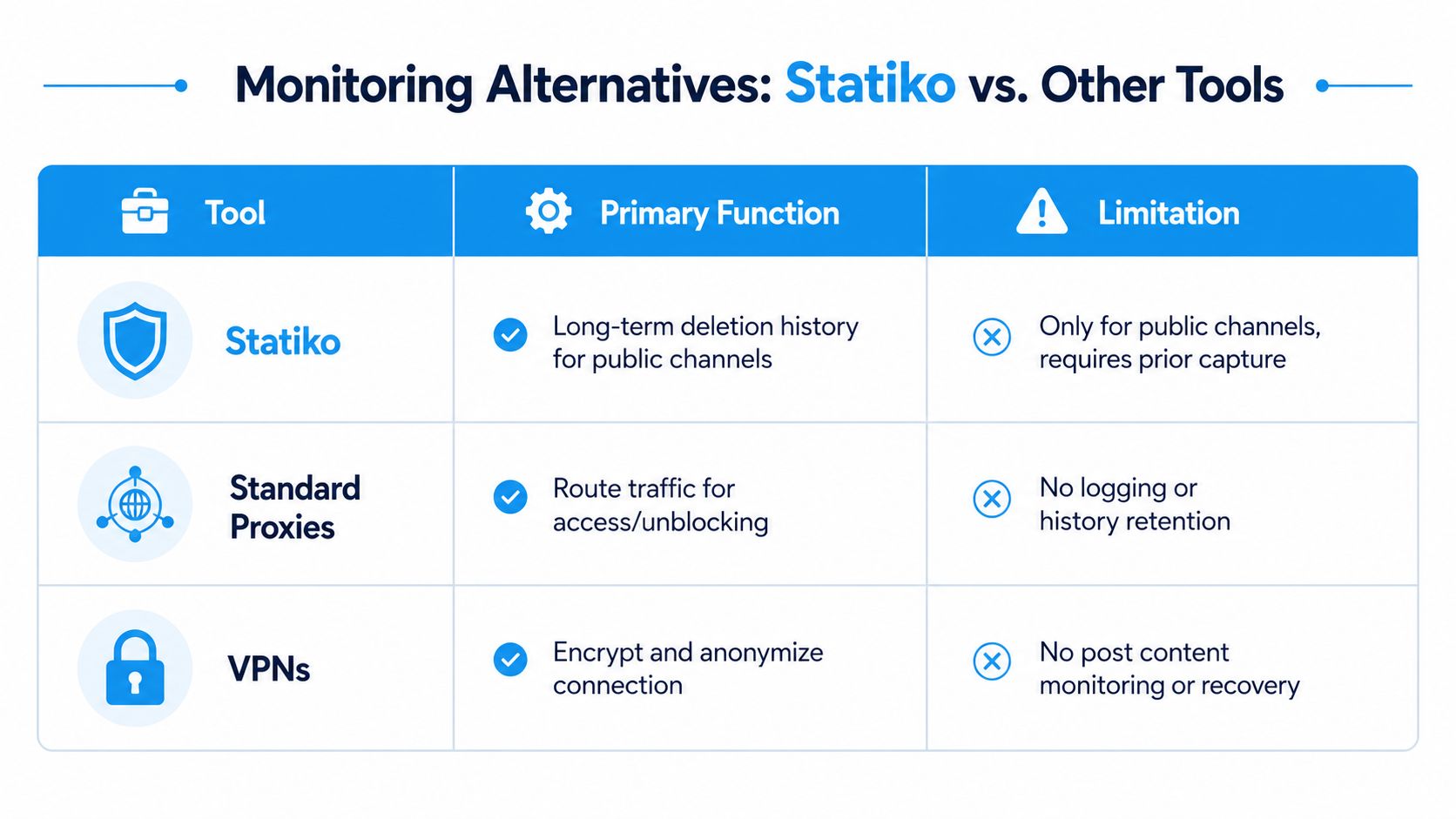
A proxy is not a recovery tool. Neither is a VPN. Those products handle network access, while Statiko sits at the message layer and preserves public-channel history over time. If you're blocked from reaching Telegram, a proxy or VPN gets you connected. If you want deleted-post history, they don't touch the problem.
Know which layer you're working on
Standard proxies and MTProxy-style tools route traffic. They're useful for access and unblocking, especially in restricted regions. They do not log Telegram post history, and they don't preserve deleted content. VPNs encrypt and anonymize the connection, which helps with privacy and access, but they still don't monitor message changes or recover deleted posts.
That's the clean split. Network tools get you in. Monitoring tools preserve the content you care about.
Why Statiko sits in the right place
Statiko isn't trying to replace a VPN. It solves a different problem: keeping a historical record of public-channel posts, edits, and deletions. That puts it closer to an archive and analytics layer than to an access workaround.
Against paid third-party indexers, the practical difference is entry friction. Some archive services charge for deleted-post visibility, while Statiko starts from search and a channel timeline. Separate access from history in your head, then use the tool that matches the job.
If the channel is public and you need deletion history, use a tracker. If the channel is blocked or unreachable, use a proxy or VPN. Mixing those two problems wastes time.
Troubleshooting, Privacy, and Legal Cautions
If a channel doesn't show up in Statiko's search, don't assume the tool is broken. The channel may never have been indexed, it may be private, or the link may be wrong. Telegram links that fail to resolve usually mean the channel is unavailable to public preview, not that some hidden recovery path exists.
What to check when nothing appears
Confirm the channel is public, confirm the handle is correct, and confirm it was available for public preview. If it wasn't indexed before deletion, there's no history to inspect. That's not a software error, it's the consequence of late tracking.
A responsible research workflow looks like this:
- Verify the source: make sure the channel handle, post link, or forward really belongs to the channel you think it does.
- Cross-check timing: compare the post date, the deletion moment, and any archive snapshot you found — the guide on verifying a deleted Telegram post existed covers what each trace is worth as evidence.
- Save supporting context: keep the surrounding posts, not just the deleted one, so you can judge whether the record is authentic.
- Respect access boundaries: public channels are trackable, private groups and DMs are not.
Privacy and legal lines you should not cross
Only public channels belong in this workflow. Private channels, groups, and direct messages are off limits. If you scrape or archive public content, think hard before republishing it, because copyright, platform rules, and local retention laws still apply. WebscrapingHQ's guide on compliance in web scraping is a fair reminder that public access still carries legal and ethical limits.
Statiko's free plan is a sensible starting point for monitoring public channels without guessing. Proxies and VPNs belong in your toolbox when access is the issue. Statiko belongs there when the issue is preserving deletions.
FAQ
Can you see deleted posts from a Telegram channel without admin access? Only if a copy already existed: a forward someone saved, a file cached on your device, or a third-party archive that indexed the channel first. Telegram gives ordinary viewers no restore path.
How long do deleted posts stay in Telegram's Recent Actions log? Roughly 48 hours. After that the record drops out of the log and the native admin route is finished.
Does deleting a post in a Telegram channel delete forwarded copies? No. A forward is a separate message, so it survives deletion in the source channel. That's why searching your own chats and saved messages is worth a few minutes.
Can Telegram support restore a deleted channel post? No. Support doesn't recover deleted content for viewers or admins, which is why "contact support" advice goes nowhere. The same limit applies to recovering a deleted Telegram channel — there's no undelete on Telegram's side.
Do TGStat or Telemetr show every deleted post? No. They show what they indexed before the deletion. Coverage varies by channel, and historical deletions often sit behind a paid tier.
Is tracking a public Telegram channel legal? Monitoring public channels is generally fine. Republishing what you collect is a separate question governed by copyright, platform rules, and local law. Private channels, groups, and DMs are off limits either way.
If you need to preserve deleted Telegram posts in a public channel, stop chasing recovery myths and start tracking the channels you care about. Open Statiko, add the public channel in the catalog, and set up monitoring before the next deletion wipes the record out of view.
Related posts

You get 5 seconds to undo a deletion. After that your odds depend on where the message was — here is what works per chat type, and what doesn't.

Forward on any device, control what the 'Forwarded from' tag reveals, block forwards out of your own chats, and track where your posts travel.

The complete guide to AI summaries, recaps and digests of Telegram channels — how they work, the four ways to get one, and seven recap formats.
Start in seconds.
Create a free account to organise channels, track activity, and get recaps delivered to you.
Real-time. Telegram. Analytics.