Build a Telegram Sticker Bot: Complete Guide 2026
Build a production-ready Telegram Sticker Bot from scratch. This guide covers code, file formats, deployment, automation, & analytics.

Someone in your channel sends a great reaction image. Someone else manually turns it into a sticker. Pack naming gets inconsistent, duplicates creep in, nobody remembers which source file produced which sticker. A week later you have a popular pack and a maintenance problem.
The simple sticker bot is easy to sketch: accept an image, convert it, push it into a pack. The production version needs state management, validation, retries, operator controls, pack lifecycle rules, and analytics hooks that work even when Telegram doesn't expose the numbers you need. That's the gap most tutorials skip.
Why Build a Custom Telegram Sticker Bot
Telegram's official sticker documentation notes that the @Stickers mini app lets any user create and manage packs, with static stickers requiring only PNG or WEBP export. That's fine for one personal pack. The problem is repeatability.
A custom bot helps when you need to:
- Standardize submissions — consistent filenames, emoji mappings, attribution, pack targets
- Moderate input before anything hits a public or brand-owned pack
- Support UGC campaigns where members submit assets that get routed into curated packs
- Automate repetitive ops — resizing, duplicate checks, source archiving
The difference between @Stickers and a custom bot is control. @Stickers is optimized for broad usability. Your bot can be optimized for your operating model: approval queues, role-based commands, event-driven asset pipelines with audit logs. For a primer on bot behavior in Telegram, what a Telegram bot is covers the baseline.
| Need | @Stickers | Custom bot |
|---|---|---|
| One-off pack creation | Good fit | Overkill |
| Community submissions | Limited | Strong fit |
| Moderation and auditability | Minimal | Strong fit |
| Cross-system imports | Manual | Automatable |
| Operational maintenance | Basic | Designable |
Use @Stickers for personal convenience. Build your own when sticker creation becomes a repeatable community process, a branded asset pipeline, or a moderation surface.
Designing Architecture and User Experience
Most sticker bots fail not because the API is hard, but because the conversation flow is sloppy. Users don't know what to send, operators can't recover partial jobs, and the code treats every upload as valid.
Start with the user journey, not the handler functions.
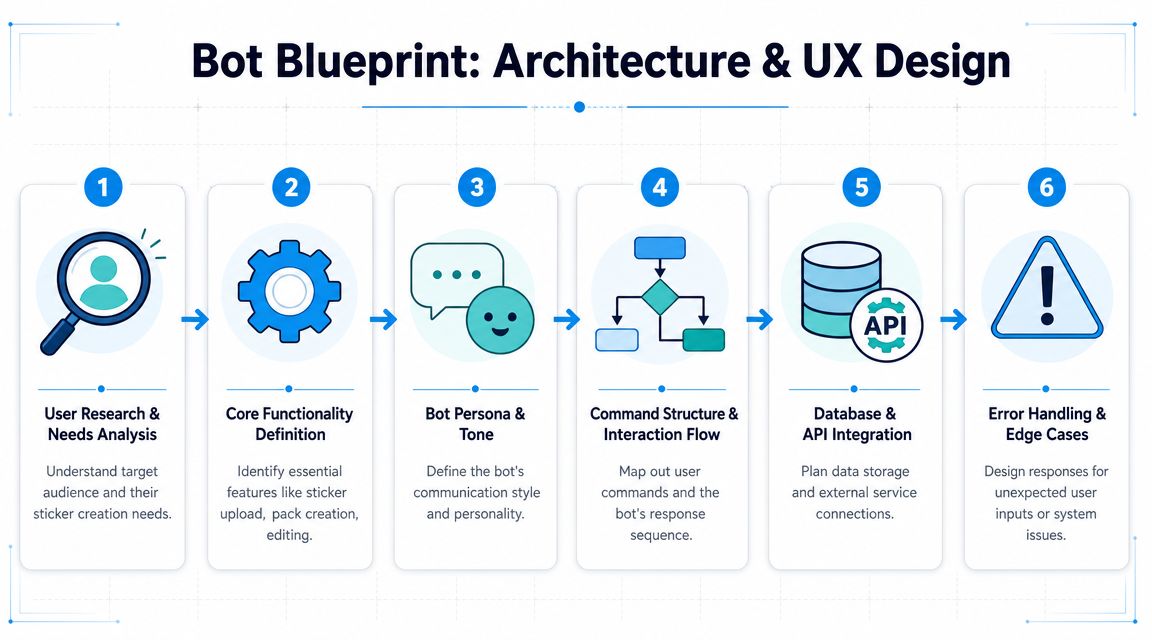
Happy path. A maintainable bot has one primary flow:
- User starts a session.
- Bot asks: new pack or existing?
- User uploads a file.
- Bot validates format, size, and transparency.
- Bot previews the processed result.
- User confirms emoji mapping and target pack.
- Bot publishes or queues for moderation.
Don't let users jump between half-finished actions without a session model. If they can send /newpack, upload three files, then issue /delsticker mid-session without explicit state transitions, you'll get corrupted operations.
Commands. Avoid command sprawl. A practical baseline:
/start— onboarding and allowed actions/newpack— pack creation/addsticker— add to existing pack/delsticker— operator-only removal/mypacks— list manageable packs/cancel— abort active session
Use inline buttons where choice matters, typed commands where intent matters. "Send a PNG with transparency" is useful. "Upload failed" is not.
Components. Separate responsibilities early:
| Component | Responsibility |
|---|---|
| Bot gateway | Receives updates, manages commands |
| Session store | Tracks action, selected pack, pending asset |
| Conversion worker | Resizes, normalizes, validates output |
| Pack manager | Calls Telegram methods for set creation/updates |
| Audit log | Records who submitted what and when |
Keeping everything in one process works for a demo, then becomes painful when you add moderation or retries. Show progress states so users know whether the bot is validating, converting, or publishing. Return actionable errors. Treat every upload as a job with a lifecycle, not a message with a file attachment.
Sticker Formats and File Requirements
Many sticker bot projects get brittle here. "Make it 512 pixels and transparent" is where most tutorials stop, but real failures come after that. Files look correct in one app then lose alpha after export. AI cutout tools leave rough edges. WEBP exports vary by encoder. The actual friction isn't just the 512-pixel rule — it's consistency across export tools and editing pipelines (YouTube reference).
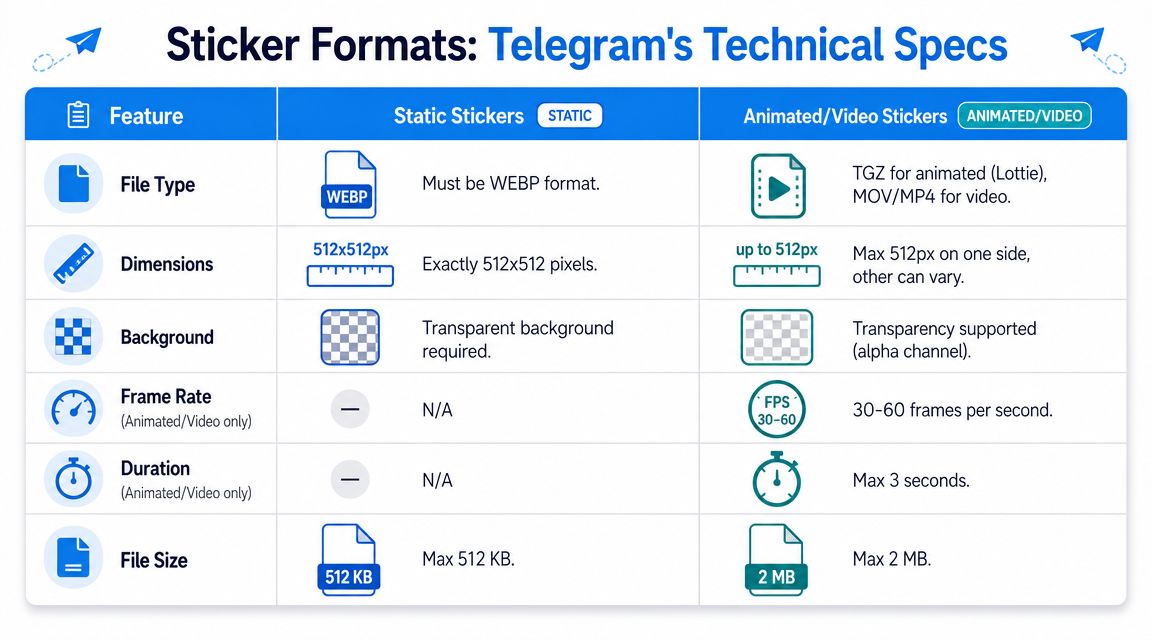
For static packs, your bot should assume users will submit PNG files with matte backgrounds, WEBP with wrong encoder settings, oversized canvases, and AI-generated images with soft halos. Accepting all of that blindly means an inconsistent pack.
Normalize every accepted file into one internal representation before final export: decode, inspect alpha, trim useless margins, fit within your canvas policy, then export through a single tested path. For rough transparent edges, a dedicated cleanup step helps — Armox Labs' background removal guide focuses on clean foreground extraction before sizing.
Cross-platform imports show a common pattern: open-source import projects handle ingestion, conversion, and pack management as separate concerns, often containerized, because LINE or KakaoTalk assets don't behave like native Telegram files (matrix-sticker-import-bot). Design the pipeline so you can swap converters later.
Don't trust the file extension. Trust what your decoder actually reads.
Validation checklist before sending anything to Telegram:
- Decode test with the exact image library you use in production
- Alpha check for expected transparency
- Canvas resize: preserve aspect ratio, no stretching
- Border padding so artwork doesn't touch edges after scaling
- One export path for all final output
- Preview render compared against submitted image
If you also manage packs strategically, Telegram sticker packs covers the publishing side.
Works: one canonical pipeline, source retention, deterministic resizing, explicit failure reasons. Doesn't work: accepting user-exported assets as-is, mixing image libraries with different alpha behavior, resizing before trimming, supporting imports without a staging layer.
Building the Bot Core Logic
Python is a comfortable choice — the ecosystem is mature and the libraries are straightforward. Write a stateful job processor that talks through Telegram, not a chat bot that touches stickers. For broader handler patterns and deployment references, see Telegram bot development.
Session state. A sticker bot becomes fragile when user intent lives only in message order. Store state explicitly.
from dataclasses import dataclass
from typing import Optional

@dataclass
class StickerSession:
    user_id: int
    action: Optional[str] = None
    pack_name: Optional[str] = None
    pack_title: Optional[str] = None
    source_file_id: Optional[str] = None
    processed_file_path: Optional[str] = None
    emoji: Optional[str] = None
Use Redis or Postgres in production. In-memory dicts work locally and fail under real uptime.
Core handler flow:
from telegram import Update, InputSticker
from telegram.ext import (
    ApplicationBuilder, CommandHandler, MessageHandler,
    ContextTypes, ConversationHandler, filters
)
import logging
import os
import tempfile

logging.basicConfig(level=logging.INFO)
logger = logging.getLogger(__name__)

ASK_IMAGE, ASK_EMOJI, CONFIRM = range(3)
sessions = {}

async def newpack(update: Update, context: ContextTypes.DEFAULT_TYPE):
    user = update.effective_user
    sessions[user.id] = {
        "action": "newpack",
        "pack_name": f"user_{user.id}_pack_by_bot",
        "pack_title": f"{user.first_name}'s Pack",
    }
    await update.message.reply_text("Send the image for the first sticker.")
    return ASK_IMAGE

async def receive_image(update: Update, context: ContextTypes.DEFAULT_TYPE):
    user = update.effective_user
    photo = update.message.photo
    document = update.message.document

    file_obj = None
    if photo:
        file_obj = await photo[-1].get_file()
    elif document and document.mime_type in ("image/png", "image/webp"):
        file_obj = await document.get_file()
    else:
        await update.message.reply_text("Send a PNG, WEBP, or image upload.")
        return ASK_IMAGE

    fd, temp_path = tempfile.mkstemp()
    os.close(fd)
    await file_obj.download_to_drive(temp_path)

    try:
        processed_path = process_static_sticker(temp_path)
    except ValueError as e:
        logger.warning("conversion_failed user_id=%s error=%s", user.id, str(e))
        await update.message.reply_text(f"Sticker validation failed: {e}")
        return ASK_IMAGE
    except Exception:
        logger.exception("unexpected_conversion_error user_id=%s", user.id)
        await update.message.reply_text("Conversion failed. Try another file.")
        return ASK_IMAGE

    sessions[user.id]["processed_file_path"] = processed_path
    await update.message.reply_text("Send an emoji for this sticker.")
    return ASK_EMOJI

async def receive_emoji(update: Update, context: ContextTypes.DEFAULT_TYPE):
    user = update.effective_user
    sessions[user.id]["emoji"] = update.message.text.strip()
    await update.message.reply_text("Reply with YES to publish this sticker.")
    return CONFIRM

async def confirm_publish(update: Update, context: ContextTypes.DEFAULT_TYPE):
    user = update.effective_user
    if update.message.text.strip().upper() != "YES":
        await update.message.reply_text("Cancelled.")
        sessions.pop(user.id, None)
        return ConversationHandler.END

    session = sessions[user.id]

    try:
        with open(session["processed_file_path"], "rb") as sticker_file:
            input_sticker = InputSticker(
                sticker=sticker_file,
                emoji_list=[session["emoji"]]
            )
            await context.bot.create_new_sticker_set(
                user_id=user.id,
                name=session["pack_name"],
                title=session["pack_title"],
                stickers=[input_sticker]
            )
    except Exception:
        logger.exception("publish_failed user_id=%s", user.id)
        await update.message.reply_text("Telegram rejected the sticker or pack.")
        return CONFIRM

    await update.message.reply_text("Sticker pack created.")
    logger.info("pack_created user_id=%s pack_name=%s", user.id, session["pack_name"])
    sessions.pop(user.id, None)
    return ConversationHandler.END

async def cancel(update: Update, context: ContextTypes.DEFAULT_TYPE):
    user = update.effective_user
    sessions.pop(user.id, None)
    await update.message.reply_text("Current sticker job cancelled.")
    return ConversationHandler.END
Your process_static_sticker() should decode, validate transparency, resize safely, pad, and export through a controlled path.
Retry and failure handling. Retry only transient failures — network interruptions, timeouts. Not bad file formats. Log structured events with user ID, pack name, and failure stage. Keep failed assets for replay. Make publish idempotent — lag shouldn't create duplicate stickers.
Adding to existing packs:
async def add_to_existing_pack(bot, user_id: int, pack_name: str, sticker_path: str, emoji: str):
    with open(sticker_path, "rb") as sticker_file:
        input_sticker = InputSticker(
            sticker=sticker_file,
            emoji_list=[emoji]
        )
        await bot.add_sticker_to_set(
            user_id=user_id,
            name=pack_name,
            sticker=input_sticker
        )
Store pack permissions separately from session state. Not every pack should be writable by every user.
Before release: per-user concurrency limits, rate-limit handling around Telegram API calls, dead-letter storage for failed conversions, admin audit actions for delete/replace/rollback, and tests for corrupt files and edge-case transparency behavior.
Deployment and Lifecycle Management
A sticker bot usually looks stable right up until the first restart. Pending jobs disappear, users retry commands, and support messages start with "it worked yesterday."

Hosting. Choose based on failure modes, not price.
| Option | Good for | Watch out for |
|---|---|---|
| Serverless | Lightweight command routing | Cold starts, short execution windows, awkward file handling |
| Managed Python hosting | MVPs and admin tools | Limited worker control |
| VPS | Full runtime control | Patching, supervision, backups on you |
| Containers on platform | Repeatable deploys, worker separation | More setup |
For admin workflows and event plumbing, no-code backend API solutions can reduce ops work around supporting services. They don't replace image conversion or Telegram-specific error recovery.
Service separation. Run the bot as separate services once you have real traffic:
- Webhook/polling service receives updates and validates flow
- Worker service runs conversion, validation, retries, and publish jobs
- Queue buffers work so chat response time stays fast
- Database stores sessions, job states, pack metadata
- Object storage keeps original uploads and normalized outputs for replay
If conversion starts failing, you can pause workers without taking command intake offline. If Telegram rate-limits you, jobs wait in the queue instead of disappearing from process memory.
Job state outside Telegram. Store enough metadata to answer operational questions without scraping chat history: source file, normalized output, emoji, target pack, submitter, approval state, publish attempt count, and final Telegram object identifiers.
State model: received → validated → converted → approved → publishing → published → failed → replaced → removed. If a worker dies during publishing, the next worker needs to know whether to retry, check for a completed operation, or escalate. This is where duplicate stickers and broken audit trails usually come from — and it's the step most tutorials skip.
Deploys. Build one immutable artifact per release, pin dependency versions, run schema migrations explicitly, promote the same image from staging to production, and drain workers during breaking job changes.
Day-one operational controls: secret management via env vars, health endpoints, structured logs with job ID, job timeouts and retry limits, dead-letter handling, scheduled cleanup for temp files and abandoned sessions, admin commands for replay/cancel/republish.
A bot that can only create stickers is a demo. One that can replay work, survive deploys, and maintain a clean audit trail is something you can run for months without dreading every restart.
Monitoring and Sticker Engagement
Telegram doesn't give bots sticker-set statistics. In a TDLib Bot API issue, Telegram maintainers confirmed that stats are only available to the set owner through @Stickers, and that broad statistical polling isn't scalable. You need your own telemetry.
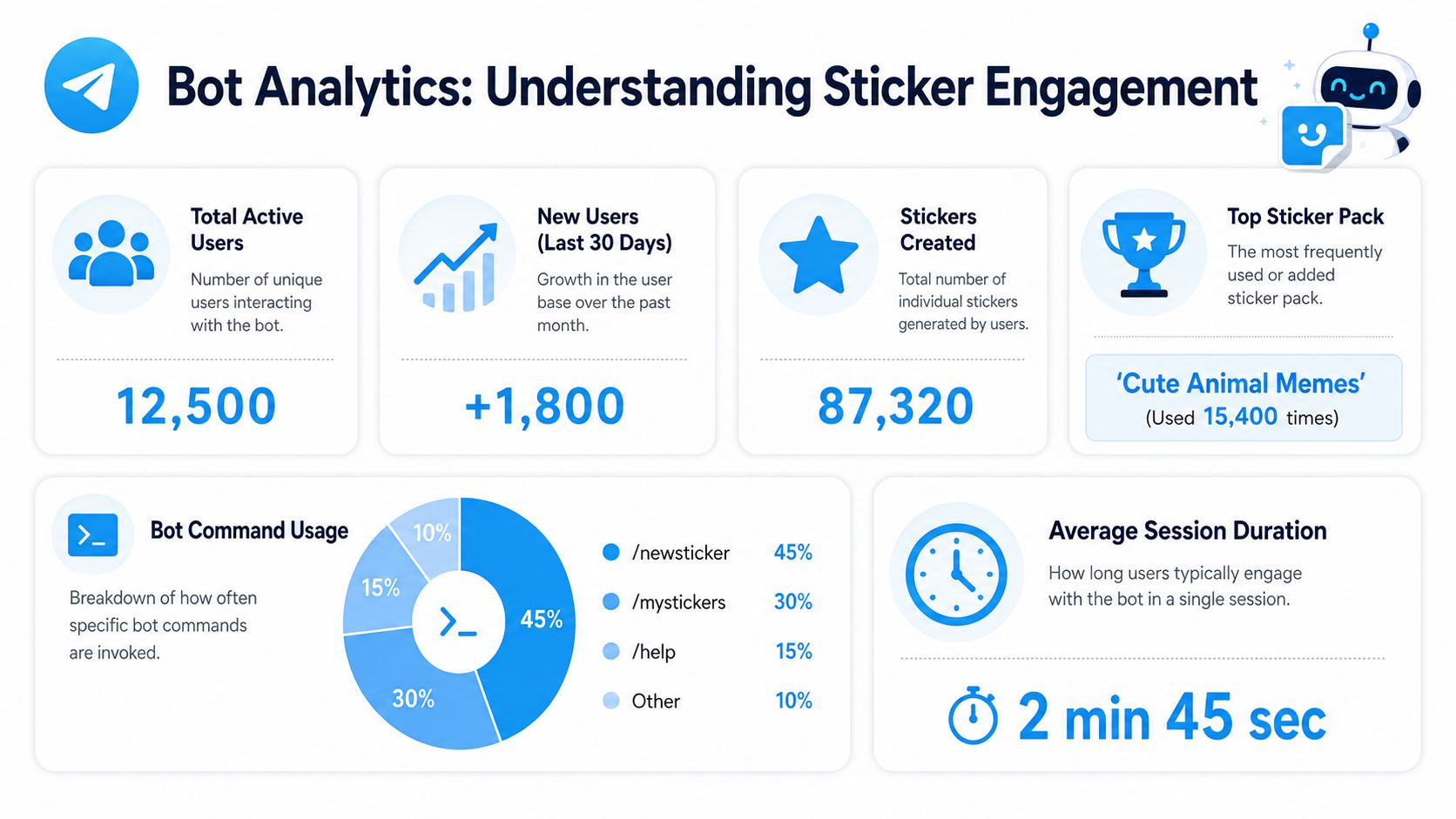
Focus on what your system can observe:
- Command events —
/newpack,/addsticker,/cancel - Conversion outcomes — validation failures, export failures
- Publish outcomes — successful pack creation or sticker addition
- Moderation decisions
- Drop-offs — upload received but emoji never submitted
This won't tell you how often a published sticker gets used across Telegram. It tells you how your pipeline behaves — which is what you can actually improve.
| Layer | What to measure |
|---|---|
| Acquisition | New users starting sticker sessions |
| Activation | Users completing at least one sticker flow |
| Reliability | Conversion failures, publish failures, timeout frequency |
| Operations | Moderation backlog, replacement frequency, duplicate submissions |
If users start jobs but don't finish, your prompts are probably unclear. If publish attempts fail after conversion, your exporter or metadata validation needs work.
For public channel context, Statiko tracks channel metrics, message edits, deletions, and growth signals — useful for correlating sticker pack launches with broader channel activity without relying on private chat data.
Ship with: structured application logs, a persistent event table, an admin view for failed jobs, a simple dashboard for command and publish activity, and alerting for repeated failures.
If you're building sticker workflows alongside a public Telegram channel strategy, Statiko can add the missing channel-side context. It tracks public-channel message history, edits, deletions, and growth signals, which makes it useful when you want to compare sticker pack launches or UGC pushes against broader publishing activity.
Related posts

Design stickers people actually send, publish a pack through @Stickers in minutes, and track what the launch did to your subscribers and engagement.

Discover what is a Telegram bot and how these automated assistants work. This guide explains their power for channel management, marketing, and automation.

Learn Telegram bot development with our guide to building, deploying, and scaling secure, feature-rich bots with Python, Node.js, and TON integration.
Start in seconds.
Create a free account to organise channels, track activity, and get recaps delivered to you.
Real-time. Telegram. Analytics.